

Nmap
1. Introduction:
Section titled “1. Introduction:”Nmap (“Network Mapper”) é um dos principais utilitários do arsenal de ferramentas para pentest.
It is a free and open source utility for network discovery and security auditing.
Many systems and network administrators also find it useful for tasks such as network inventory, managing service upgrade schedules, and monitoring host or service uptime.
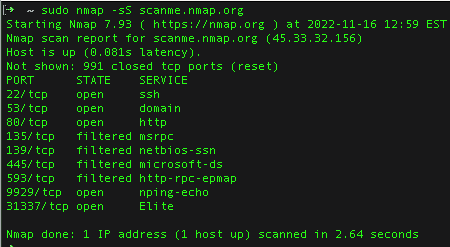
2. Main funcitions:
Section titled “2. Main funcitions:”-
Descoberta de hosts ativos dentro de uma determinada faixa de rede;
-
Descobertas das portas desses mesmos hosts e identificação de serviços atreladaos a elas;
-
Utilização de scripts NSE (Nmap Scripting Engine);
-
Identificação de portas de portas TCP e UDP;
-
Identificação do sistema operacional;
-
Nmap runs on all major computer operating systems, and official binary packages are available for Linux, Windows, and Mac OS X;
-
Uso tanto tanto por meio do Shell quanto interface gráfica (Zenmap GUI).
3. Structure
Section titled “3. Structure”nmap [Scan Type(s)] [Options] {target specification}Obs.: Por padrão, Nmap irá realizar a filtragem somente de portas TCP.
4. Arguments
Section titled “4. Arguments”| OPTION | DESCRIPTION |
|---|---|
| -A | Enable OS and version detection, script scanning, and traceroute. |
| -sn | It does not return port numbers |
| -oN | Output scan to file |
| -v | Verbose (it lists everywhere the scan is doing in real time) |
5. Use
Section titled “5. Use”5.1. Domain scanning:
Section titled “5.1. Domain scanning:”nmap scanme.nmap.orgResponse:
Starting Nmap 7.98 ( https://nmap.org ) at 2025-12-07 20:54 -0300Nmap scan report for scanme.nmap.org (45.33.32.156)Host is up (0.20s latency).Other addresses for scanme.nmap.org (not scanned): 2600:3c01::f03c:91ff:fe18:bb2fNot shown: 991 closed tcp ports (conn-refused)PORT      STATE    SERVICE22/tcp    open     ssh25/tcp    filtered smtp80/tcp    open     http135/tcp   filtered msrpc139/tcp   filtered netbios-ssn445/tcp   filtered microsoft-ds1434/tcp  filtered ms-sql-m9929/tcp  open     nping-echo31337/tcp open     Elite
Nmap done: 1 IP address (1 host up) scanned in 17.14 seconds
5.2. Device scanning:
Section titled “5.2. Device scanning:”nmap -v 192.168.1.1Response:
Starting Nmap 7.98 ( https://nmap.org ) at 2025-12-07 21:19 -0300Initiating Ping Scan at 21:19Scanning 192.168.1.1 [2 ports]Completed Ping Scan at 21:19, 0.00s elapsed (1 total hosts)Initiating Parallel DNS resolution of 1 host. at 21:19Completed Parallel DNS resolution of 1 host. at 21:19, 0.02s elapsedInitiating Connect Scan at 21:19Scanning _gateway (192.168.1.1) [1000 ports]Discovered open port 139/tcp on 192.168.1.1Discovered open port 21/tcp on 192.168.1.1Discovered open port 23/tcp on 192.168.1.1Discovered open port 445/tcp on 192.168.1.1Discovered open port 80/tcp on 192.168.1.1Discovered open port 1900/tcp on 192.168.1.1Completed Connect Scan at 21:20, 1.24s elapsed (1000 total ports)Nmap scan report for _gateway (192.168.1.1)Host is up (0.018s latency).Not shown: 993 closed tcp ports (conn-refused)PORT     STATE    SERVICE21/tcp   open     ftp23/tcp   open     telnet53/tcp   filtered domain80/tcp   open     http139/tcp  open     netbios-ssn445/tcp  open     microsoft-ds1900/tcp open     upnp
Read data files from: /usr/bin/../share/nmapNmap done: 1 IP address (1 host up) scanned in 1.42 seconds
5.3. Network scanning:
Section titled “5.3. Network scanning:”nmap -v 10.10.141.0/24Response:
5.4. Get list of IPs addresses:
Section titled “5.4. Get list of IPs addresses:”This method is known better as
Ping Scan
nmap -sn 192.168.0.0/24Or:
nmap -sn 192.168.0.0-255Responde:
Starting Nmap 7.98 ( https://nmap.org ) at 2025-12-07 21:38 -0300
Nmap scan report for 192.168.1.1Host is up (0.0038s latency).MAC Address: 1C:3B:F3:F9:A9:EF (TP-Link Technologies)
Nmap scan report for 192.168.1.102Host is up (0.100s latency).MAC Address: C6:2E:82:8D:B7:90 (Unknown)
Nmap scan report for 192.168.1.107Host is up (0.10s latency).MAC Address: 70:B1:3D:38:29:E1 (Samsung Electronics)
Nmap scan report for 192.168.1.112Host is up (0.18s latency).MAC Address: 32:52:C4:0F:91:31 (Unknown)
Nmap scan report for 192.168.1.114Host is up (0.10s latency).MAC Address: DE:D0:82:B6:18:E8 (Unknown)
Nmap scan report for 192.168.1.119Host is up.
Nmap done: 256 IP addresses (6 hosts up) scanned in 2.93 seconds

```bashnmap -sn -n 192.168.1.1/24 | grep 192 | cut -d ' ' -f 5 > ips.txt
5.5. Locate port
Section titled “5.5. Locate port”Selecionar porta específica
Section titled “Selecionar porta específica”nmap -p 80 scanme.nmap.org -vResultado:
Starting Nmap 7.80 ( https://nmap.org ) at 2025-12-09 08:59 -03Initiating Ping Scan at 08:59Scanning scanme.nmap.org (45.33.32.156) [4 ports]Completed Ping Scan at 08:59, 0.01s elapsed (1 total hosts)Initiating Parallel DNS resolution of 1 host. at 08:59Completed Parallel DNS resolution of 1 host. at 08:59, 0.00s elapsedInitiating SYN Stealth Scan at 08:59Scanning scanme.nmap.org (45.33.32.156) [1 port]Discovered open port 80/tcp on 45.33.32.156Completed SYN Stealth Scan at 08:59, 0.01s elapsed (1 total ports)Nmap scan report for scanme.nmap.org (45.33.32.156)Host is up (0.00068s latency).Other addresses for scanme.nmap.org (not scanned): 2600:3c01::f03c:91ff:fe18:bb2f
PORT   STATE SERVICE80/tcp open  http
Read data files from: /usr/bin/../share/nmapNmap done: 1 IP address (1 host up) scanned in 0.11 seconds           Raw packets sent: 5 (196B) | Rcvd: 2 (88B)
5.6. Down hosts:
Section titled “5.6. Down hosts:”To know all the down hosts on the network devices range, use this:
nmap -n -sn -v 10.10.37.0/24 -oG - | awk '/Down$/{print $2}'5.7. Output File
Section titled “5.7. Output File”nmap -sS 10.11.1.0/24 -iL host.txt6. Nmap Scriptting:
Section titled “6. Nmap Scriptting:”List all DNS script for Nmap:
ls -al /usr/share/nmap/scripts/List DNS script for Nmap:
ls -al /usr/share/nmap/scripts/ | grep -e "dns-"broadcast-dns-service-discovery.nsedns-blacklist.nsedns-brute.nsedns-cache-snoop.nsedns-check-zone.nsedns-client-subnet-scan.nsedns-fuzz.nsedns-ip6-arpa-scan.nsedns-nsec3-enum.nsedns-nsec-enum.nsedns-nsid.nsedns-random-srcport.nsedns-random-txid.nsedns-recursion.nsedns-service-discovery.nsedns-srv-enum.nsedns-update.nsedns-zeustracker.nsedns-zone-transfer.nse7. Varredura básica
Section titled “7. Varredura básica”nmap -sSA flag acima significa half syn (meia conexão). O atacante não realiza a conexão completa no alvo (porta TCP).
nmap -sTConexão completa.